
Deal visit metrics
The Deals list includes three columns dedicated to the proposal sent to the contact: Views, Engagement, and Last seen. A newly created deal, with no proposal opened yet, shows COLD and Unseen under Views (see the temperature indicator in Predict close probability), NONE under Engagement, and -- under Last seen.
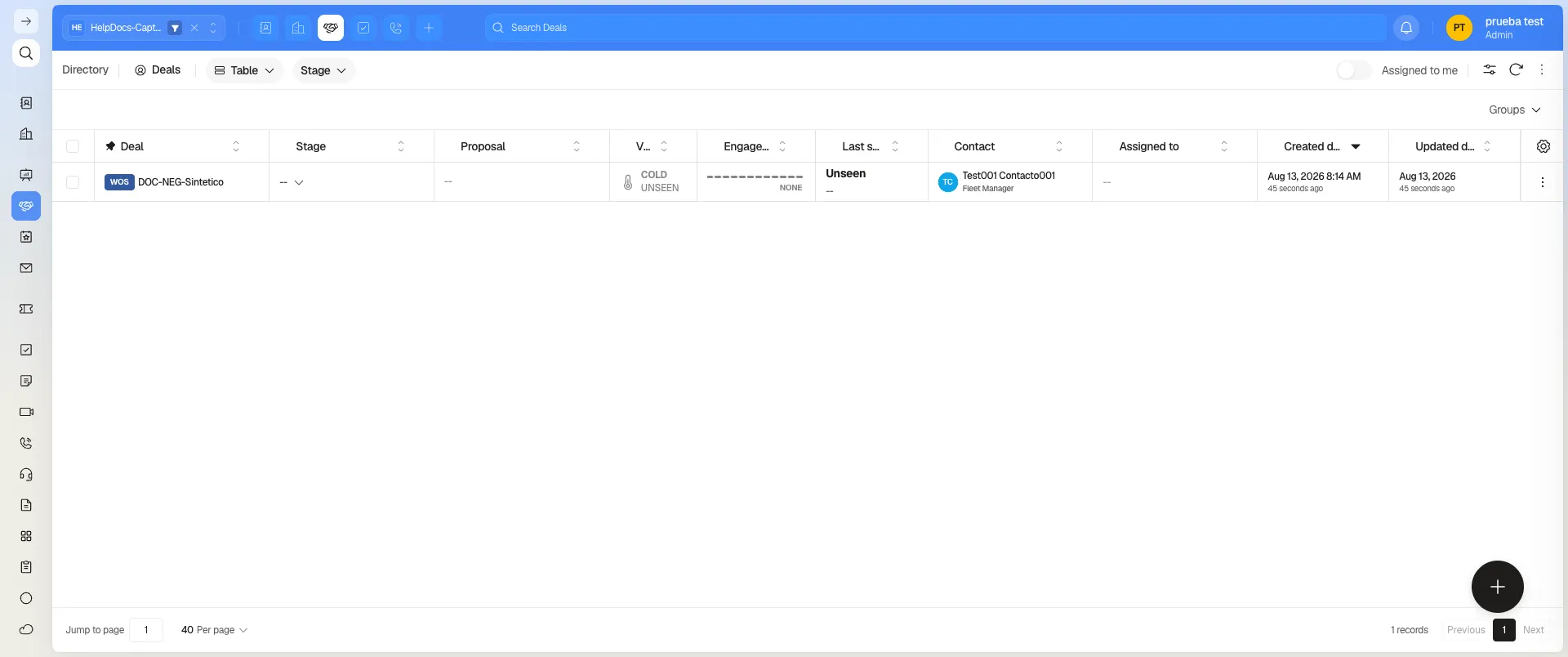
Important: these three columns describe the proposal sent to the contact — not your team’s activity inside the deal’s record in Prolibu. If nobody has opened the proposal link, the deal shows “Unseen” even if your team reviewed it internally several times.
Seeing the view detail
Section titled “Seeing the view detail”Once a deal has recorded views, the Views column becomes a link (for example “3 views”) with a View engagement action. Selecting it opens a panel with the total view count, the date of the last one, a views-per-day chart for the last 30 days, and a chronological history that combines stage changes with each individual view of the proposal.
Doesn’t exist: a counter for proposal send “attempts.” The available metrics are Views, Engagement, and Last seen, plus the detail in View engagement.
Frequently asked questions
No. It refers to the proposal sent to the contact, not visits to the deal's internal record in Prolibu.
Select the link under the Views column (for example "3 views") to open View engagement, with the date of each view and the stage history.
That metric doesn't exist. The available columns are Views, Engagement, and Last seen.
Was this article helpful?
Thanks for your feedback!