
Manage unsubscribe links for one-to-one emails
Prolibu has every piece of an opt-out — per-message tokens, per-contact state, configurable reasons — but assembled differently from HubSpot: here the link doesn’t appear at the foot of the email by itself, you place it where you want using a variable.
The link: two variables in the Consent group
Section titled “The link: two variables in the Consent group”In an email template’s editor, Insert variable opens the field tree. The last group is Consent, described as “URLs to accept or reject consent”, and it holds exactly two:
- Accept URL — “The recipient accepts consent”.
- Reject URL — “The recipient rejects consent”.
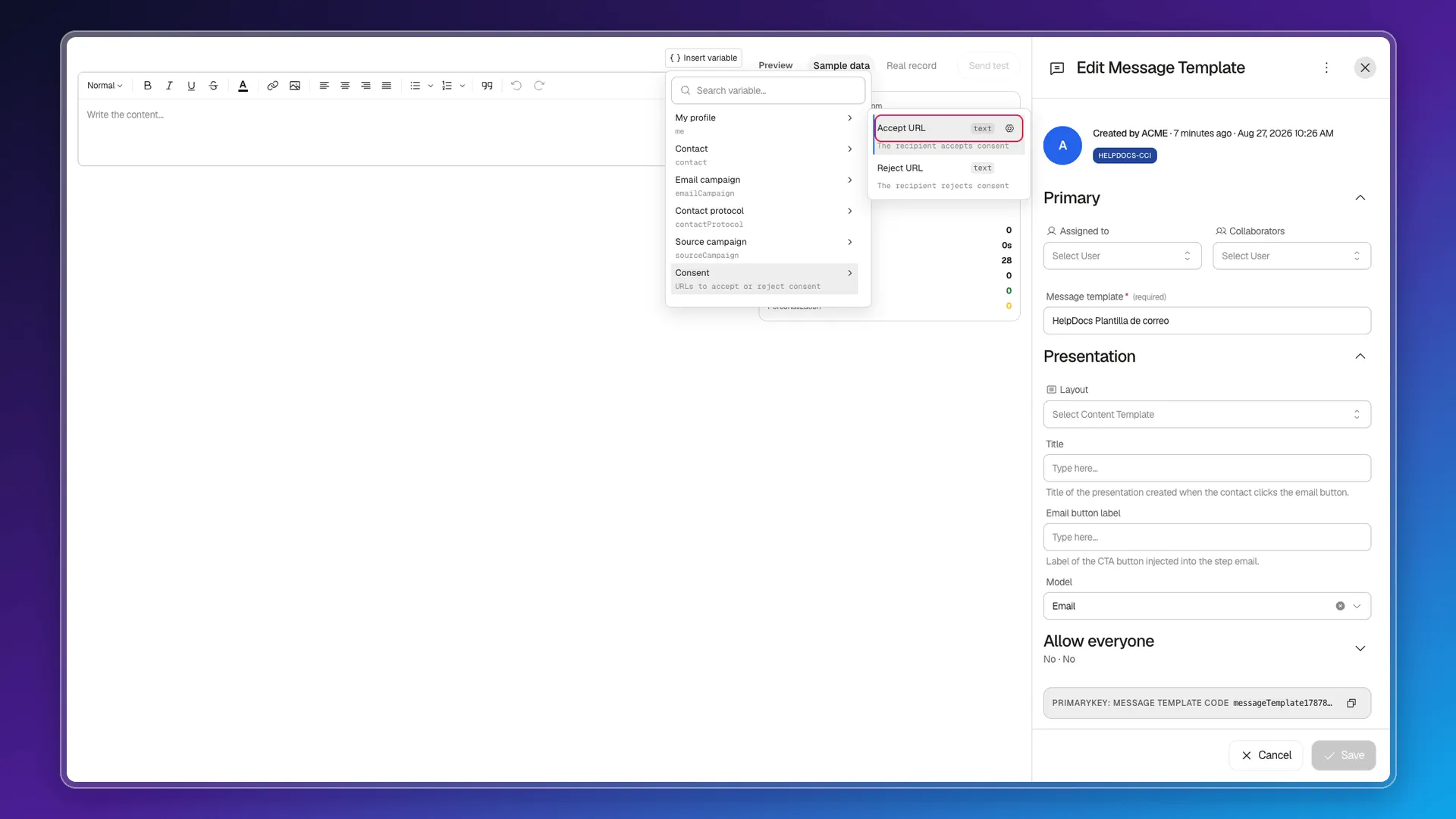
You insert whichever you need inside the text — usually reject, in a closing paragraph — and at send time it resolves to a URL unique to that message. Each email carries its own unsubscribe token and its own consent token, so the link identifies the recipient without you doing anything.
The practical consequence cuts both ways: the link text is yours (write whatever phrase you like around the variable, in whatever language), and if you forget to add it, the email goes out with no opt-out link. There is no safety net.
What happens when someone opts out
Section titled “What happens when someone opts out”The state doesn’t live on the email, it lives on the contact. Every contact has an email status with four possible values — subscribed (the starting point), unsubscribed, bounced and complained — along with reason, source, date and any feedback text the person left.
The system writes that state: it isn’t a field you edit by hand from the record. You can surface it in the Contacts table as a column, from the column picker, together with the consent subfields.
Separately from email status, each contact carries its own consent with three values — pending, accepted and rejected — plus the date, the policy version they accepted and a change history. A newly created contact starts out subscribed with consent pending.
Unsubscribe reasons are configurable, but for campaigns
Section titled “Unsubscribe reasons are configurable, but for campaigns”Under Preferences → Modules → Sales → Email Campaigns, the Habeas data section includes Unsubscribe reasons: “Options shown on the unsubscribe page for why the contact is opting out”.
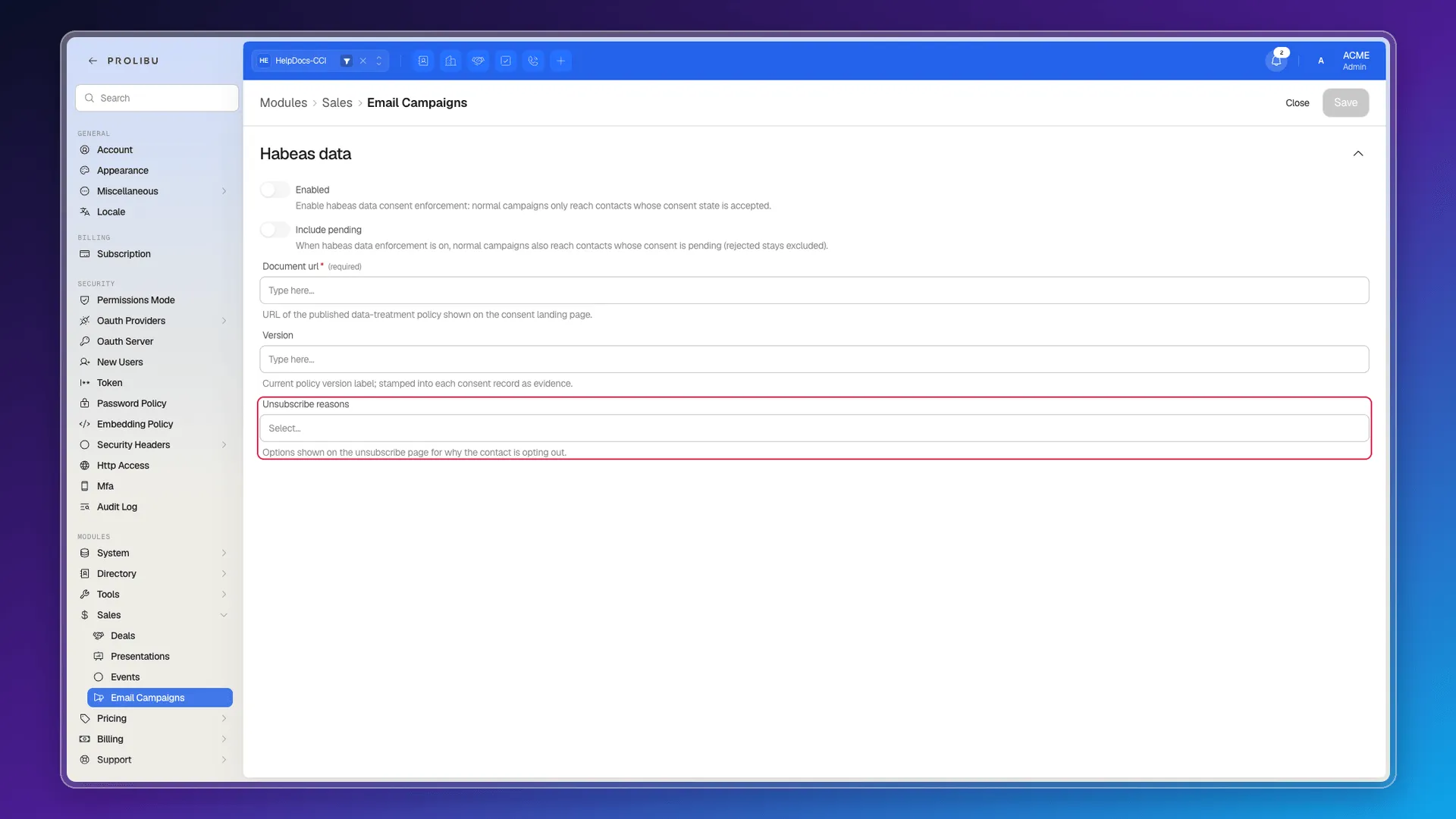
Those are the options the person sees on the opt-out page. The same section lets you publish the document URL of your data-treatment policy and its version, which is stamped onto every consent record as evidence.
The two toggles on that screen are covered in Manage your default unsubscribe settings.
What’s missing compared with HubSpot
Section titled “What’s missing compared with HubSpot”- There are no subscription types (commercial, newsletter, product updates…): the contact’s state is a single, global one.
- There’s no per-email option to drop the link for this send, because it isn’t added automatically either.
- There’s no phrase picker and no language setting for the link; you write the text.
Frequently asked questions
No. There is no automatic footer; the link goes into the body via the Accept URL and Reject URL variables in the Consent group.
On the contact itself. Their email status can be subscribed, unsubscribed, bounced or complained, with reason, source and date, and it can be added as a column in the Contacts table.
Yes, because you write the link yourself: the variable supplies the URL and the visible text is whatever you put around it. What doesn't exist is HubSpot's picker of preset phrases.
Yes, under Preferences → Modules → Sales → Email Campaigns → Unsubscribe reasons, though that screen is written for campaigns rather than one-to-one emails.
Was this article helpful?
Thanks for your feedback!