
Manage your default unsubscribe settings for one-to-one emails
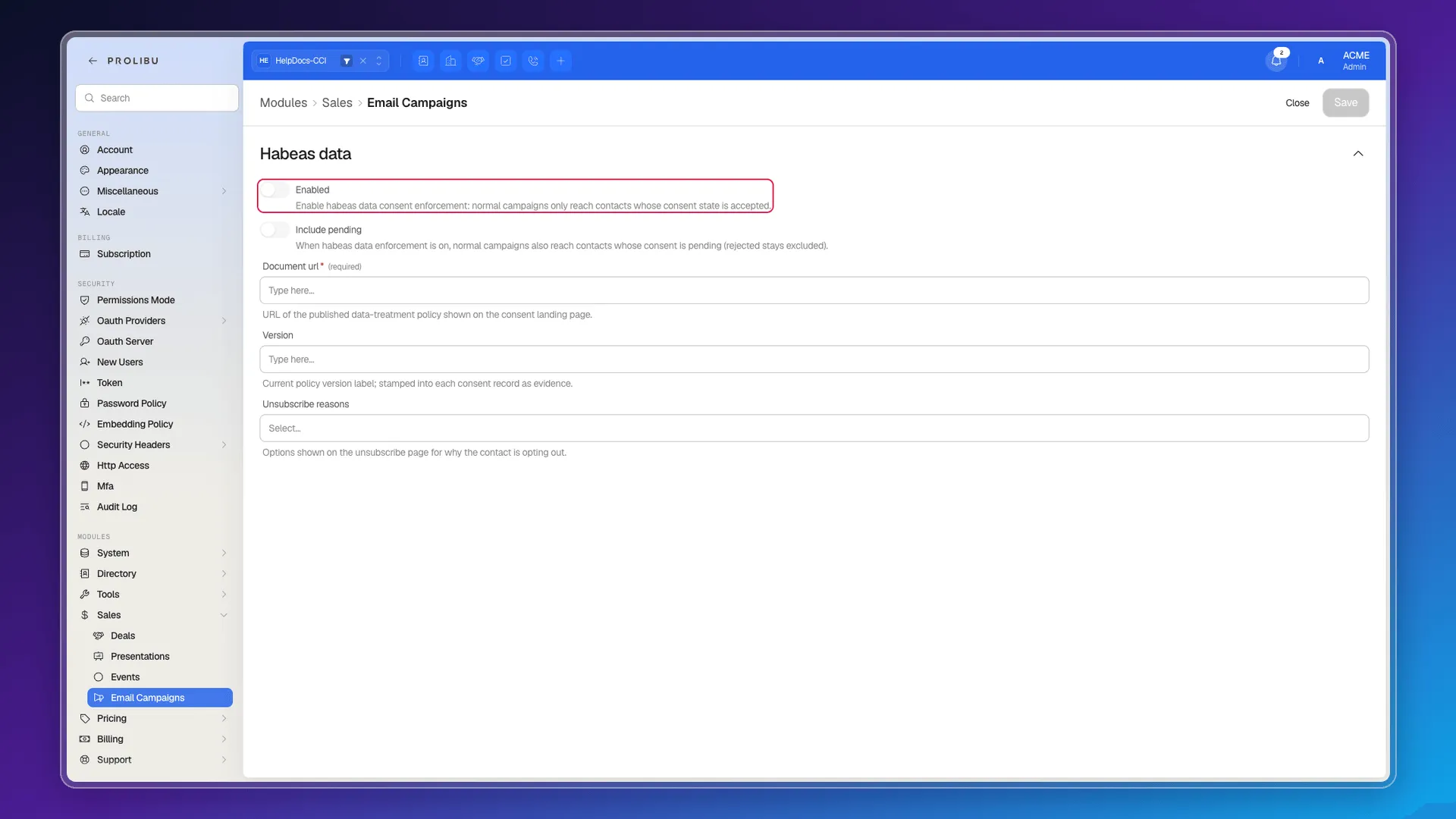
All of Prolibu’s opt-out and consent configuration fits on one screen: Preferences → Modules → Sales → Email Campaigns, section Habeas data.
The two toggles
Section titled “The two toggles”Enabled — “Enable habeas data consent enforcement: normal campaigns only reach contacts whose consent state is accepted”. Off (the factory value), nothing is filtered. On, a contact only receives if their consent is accepted.
Include pending — “When habeas data enforcement is on, normal campaigns also reach contacts whose consent is pending (rejected stays excluded)”. It only has an effect with the first toggle on, and it exists for the realistic case: an inherited database where hardly anyone has answered yet. Rejected contacts stay out regardless; this toggle does not bring them back.
It’s worth reading the order of the states to see the impact. A new contact starts with consent pending, not accepted. So turning Enabled on without Include pending in an account that never asked for consent leaves out practically the whole database until people respond.
The two fields that document the policy
Section titled “The two fields that document the policy”Document url (required) — “URL of the published data-treatment policy shown on the consent landing page”. This is the data-treatment policy shown to the person on the page where they accept or reject.
Version — “Current policy version label; stamped into each consent record as evidence”. The version label is stored on each contact’s consent, so later you can tell exactly which text each person accepted and when. That’s the part that turns the record into evidence rather than a bare yes.
The third field, Unsubscribe reasons, is covered in Manage unsubscribe links.
What’s missing compared with HubSpot
Section titled “What’s missing compared with HubSpot”The underlying difference is one of scope. HubSpot separates two levels — the account decides whether to impose its setting on everyone, and each user adjusts their own when it isn’t imposed — and Prolibu only has the account level. Specifically, we did not find:
- The “apply the same unsubscribe link setting to all users” checkbox, and therefore no way to let individuals manage their own.
- The toggle to include unsubscribe text and link in every email automatically. In Prolibu the link is inserted by hand with a variable.
- The link text editor with preset phrases.
- Any equivalent setting inside the one-to-one email area: Habeas data hangs off Email Campaigns, and its help text talks about campaigns.
Frequently asked questions
Under Preferences → Modules → Sales → Email Campaigns, in the Habeas data section. It's an account-level setting; there is no per-user equivalent.
It turns on the consent filter — with it on, normal campaigns only reach contacts whose consent state is accepted.
It widens that filter to contacts whose consent is still pending. Rejected contacts stay excluded either way.
No. Prolibu has no per-user opt-out configuration, and no "apply the same setting to all users" checkbox like HubSpot's; there are only account settings.
Was this article helpful?
Thanks for your feedback!