
Schedule a one-to-one email from the CRM
In HubSpot, Send later lives inside the email itself: you write, pick a time, done. In Prolibu that option isn’t on the one-to-one email. This article covers what exists instead and how to get the same result.
What the one-to-one email actually decides
Section titled “What the one-to-one email actually decides”A one-to-one email has a single time control: the Send immediately toggle. On, the message goes out as soon as you create it. Off, the record stays in pending status.
What it doesn’t have is a date. An email record stores when it was sent, but not a “send this on Tuesday at 9” field. Without that date, an email with Send immediately switched off waits for a person, not a clock. That’s the practical difference from Send later: switching the toggle off gives you a draft, not a schedule.
Where scheduling does exist: campaigns
Section titled “Where scheduling does exist: campaigns”Email Campaigns has the field. At the end of the form, under Presentation, sits Scheduled at with a date picker and the note “If set in the future, the campaign is enqueued to send at this time”.
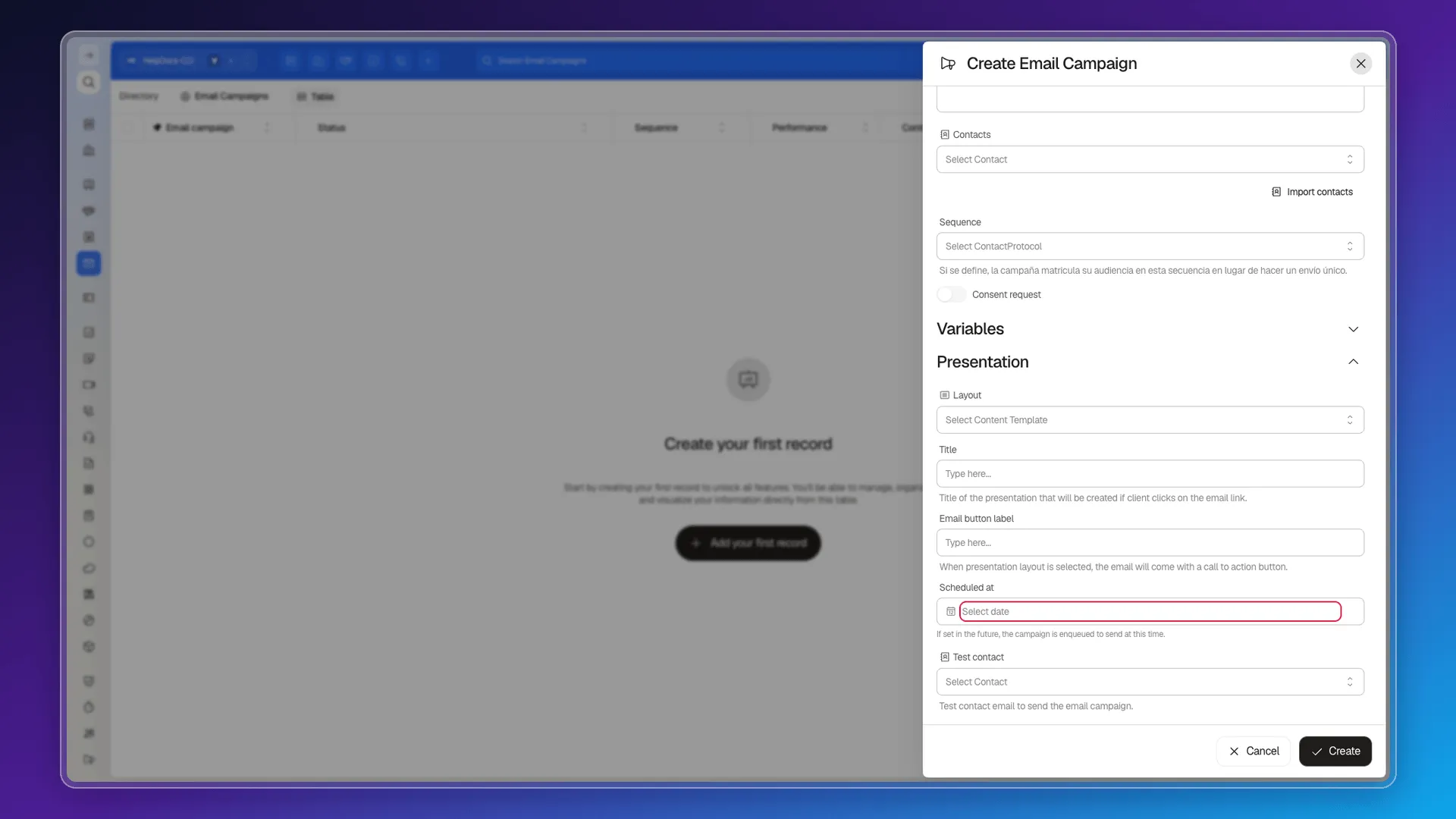
A campaign also has its own status, and one of the values is precisely Scheduled (alongside Paused, Sending, Sent and Running). The queueing machinery exists — it just hangs off the campaign.
Scheduling a message to one person
Section titled “Scheduling a message to one person”Given that, the way to pin a date and time for an email to a single contact is to create a campaign with one recipient:
- Open Email → Email Campaigns and create a new campaign.
- Name it and pick the Provider (only providers enabled for sending are listed; if none is connected, the screen itself offers Connect for Google and Microsoft).
- Write the Subject and the Message, or load one with Load message template.
- Under Contacts, select only the person you want to write to.
- Scroll to Scheduled at and pick the date and time.
- Save with Create.
Before scheduling it’s worth using Test contact, which sends the message to one specific contact so you can review it. It’s the equivalent of the “send it to me first” you’d do by hand with a one-to-one email.
The other route: sequences
Section titled “The other route: sequences”If what you need isn’t an exact hour but a cadence (“this email, then another three days later”), the campaign’s Sequence field enrols the audience in a contact protocol instead of doing a single send. Each step of the sequence carries its own delay.
The difference matters when choosing: a campaign schedules an absolute moment; a sequence chains relative waits from the moment the contact enters.
Frequently asked questions
Not directly. The one-to-one email only has the Send immediately toggle; the scheduled send date field exists on Email Campaigns, not on Emails.
Create an Email Campaign with that single contact and fill in Scheduled at. The campaign is queued and goes out at that time.
It decides whether the email goes out on creation. Switched off, the record stays in pending status — but with no date to fire the send on its own.
Scheduled at accepts any future date. We found no documented cap and no limit in the interface.
Was this article helpful?
Thanks for your feedback!