
Add videos to chat, one-to-one emails, templates, and sequence emails
In Prolibu a video inside an email is, technically, embedded content: a YouTube URL or an iframe that the editor turns into a player. There’s no recording from the app and no play analytics.
How it’s inserted
Section titled “How it’s inserted”The rich editor toolbar carries two buttons for this, side by side:
- YouTube video — opens a YouTube URL field with Add and Cancel. Paste the video link and the editor turns it into a player.
- Embed (iframe) — for any other player that provides embed code.
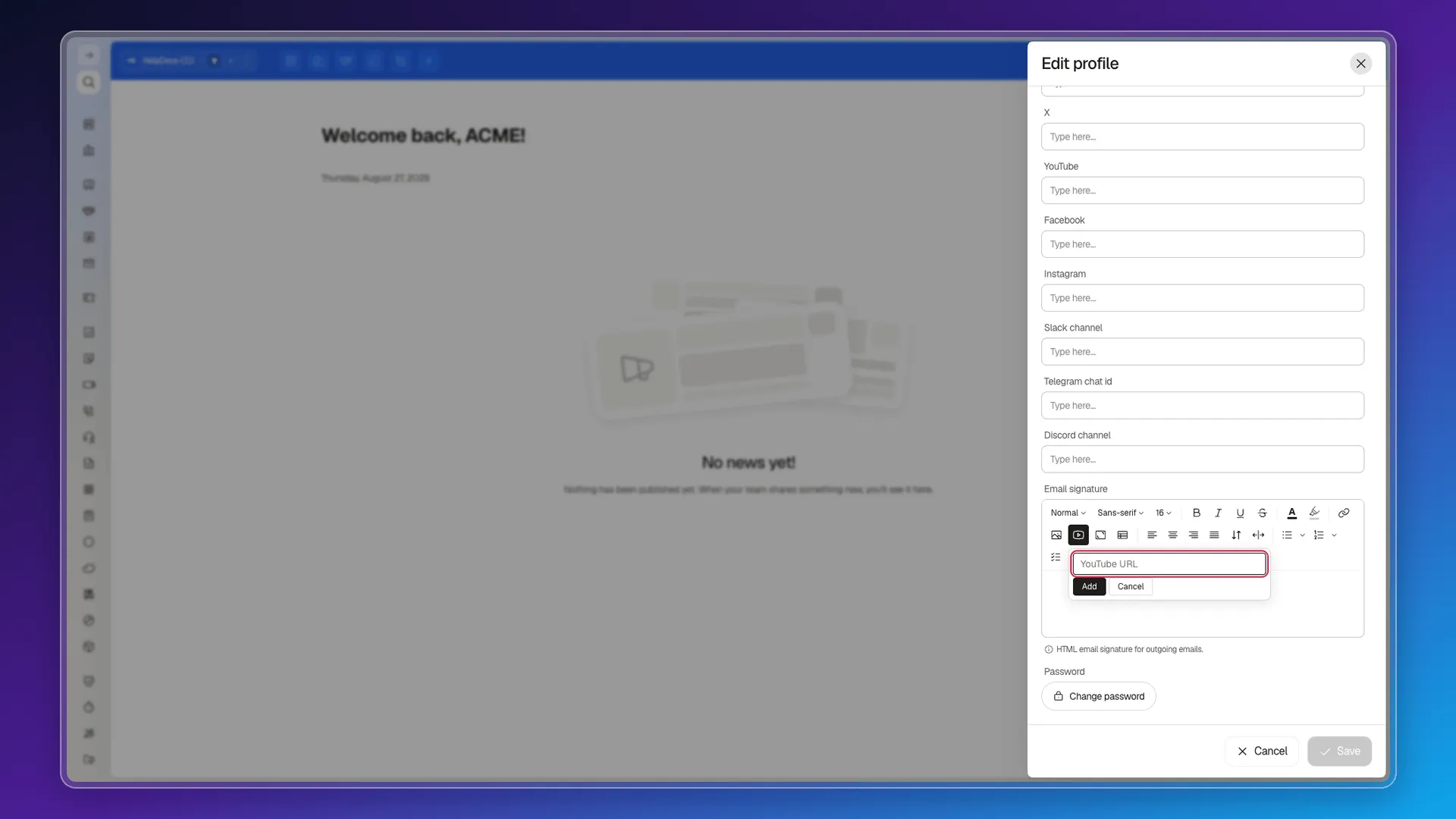
Where those buttons appear, and where they don’t
Section titled “Where those buttons appear, and where they don’t”Worth knowing before you go looking, because the editor isn’t identical everywhere:
| Where | What it offers |
|---|---|
| Body of an email template | Image only. The toolbar has 19 buttons and none of them is video. |
| Email signature (Edit profile) | Full toolbar: Image, YouTube video, Embed (iframe), table, callout… |
| Blocks in the email composer | A Video block you drag onto the canvas, alongside Section, Image, Button, Divider and the rest. |
| Email Campaigns | The same template editor, with the same reduced toolbar. |
If you need video in the body of an email, the route is the Blocks editor — the one that opens with Create design and has the Video block — or pasting the player in from a template built in the full editor. The design editor steps are in Emails and templates.
Video in chat
Section titled “Video in chat”The Google integration blurb in the Apps Hub mentions that connecting it lets you “create detailed videos to explain your proposals”. We couldn’t check that feature: it needs the Google account authorised, and the documentation account isn’t. It’s noted as pending verification, not as confirmed.
Chat and the communication centre use a different editor and aren’t covered here.
What’s missing compared with HubSpot
Section titled “What’s missing compared with HubSpot”HubSpot’s article describes a considerably fuller workflow. What we did not find in Prolibu:
- Native recording with camera, screen share and a teleprompter script (up to an hour), and the file library it lands in.
- Vidyard integration, with its Chrome extension and upload from your device.
- A custom thumbnail for the player inside the email.
- Play tracking: who watched the video and how much. Prolibu logs email opens and clicks, but a third party serves the video and keeps those metrics.
- Sharing settings (private link versus public file).
Frequently asked questions
No. There's no camera or screen recorder; the video has to be published somewhere first — YouTube or another service — and is inserted by URL.
With the YouTube video button in the editor toolbar, which asks for a YouTube URL, or with Embed (iframe) for other players. The block editor also has a Video block.
In an email template's body editor, no — only Image. The video buttons appear in the full variant of the editor, such as the email signature, and the Video block lives in the design editor.
No. Prolibu counts email opens and clicks, but not video plays; those stay in the statistics of whatever service hosts the file.
Was this article helpful?
Thanks for your feedback!