
Customize records
Custom Interfaces is a system module for inserting your own code into a record’s experience (for example, a Contact’s or Deal’s record) — not a visual layout builder. It appears in the general module search and in the panel used to customize the top bar’s shortcuts.
Creating a custom interface
Section titled “Creating a custom interface”A custom interface needs a name, a type, and a block of Code:
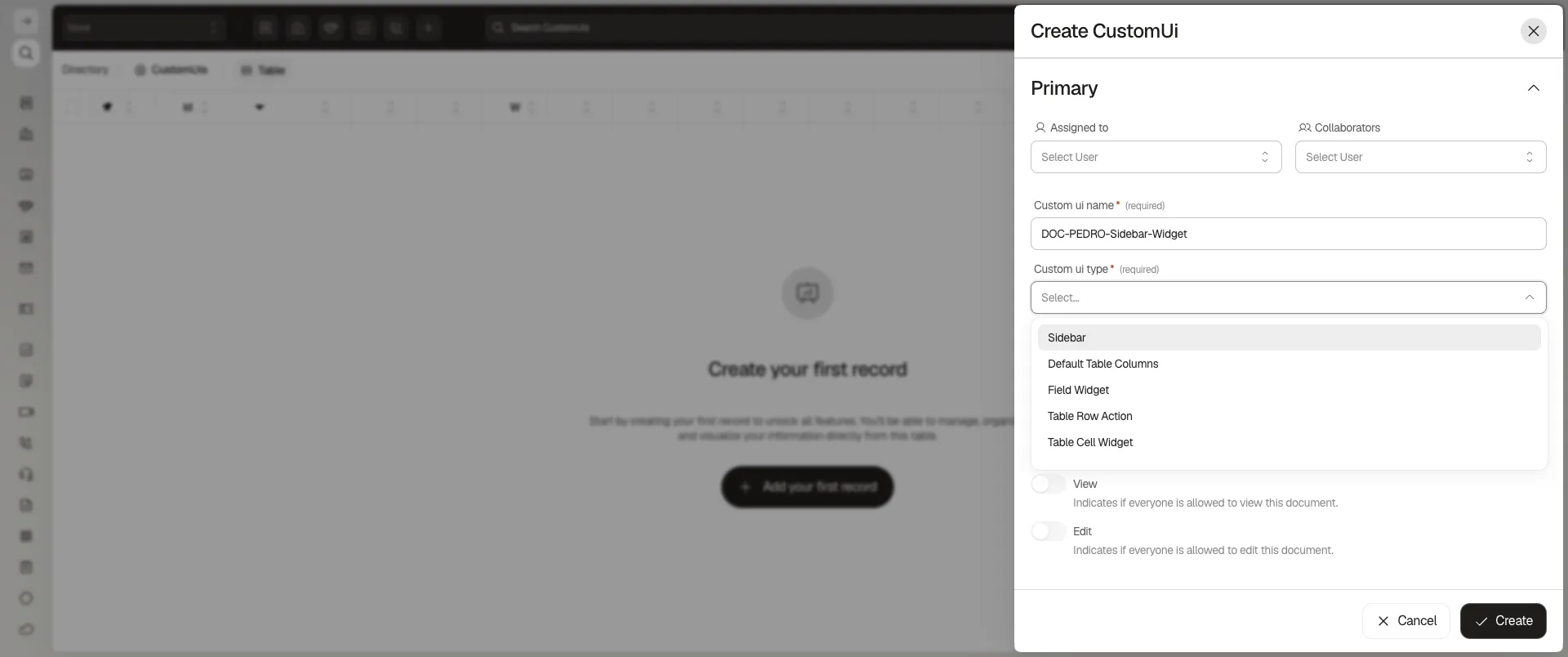
The Custom ui type dropdown offers five options:
- Sidebar — a panel injected into a record’s side panel.
- Default Table Columns — sets which columns a table shows by default.
- Field Widget — replaces or augments how a specific field renders.
- Table Row Action — adds a custom action to a row’s menu.
- Table Cell Widget — replaces how a specific cell renders in the table.
Below the type, the Code field is where the interface’s logic lives — there is no drag-and-drop layout builder. An Active switch turns the interface on or off, and Allow everyone view/edit switches control who can see or modify the CustomUi record itself (not the interface’s runtime visibility).
Frequently asked questions
It's a system module (CustomUis), available as a shortcut from the module search or the Customize shortcuts panel.
No. Custom Interfaces is a mechanism for inserting your own code into a record's experience, not a visual layout builder — the Code field holds the code itself.
Sidebar, Default Table Columns, Field Widget, Table Row Action, and Table Cell Widget.
Was this article helpful?
Thanks for your feedback!