
Use conversational enrichment for emails
HubSpot’s conversational enrichment reads the emails in a conversation and updates the CRM with what it finds: that the person is out of the office and returns on a given day, that they changed employer, that a new contact appears in the thread, that their job title is different now.
We went looking for that in Prolibu and it isn’t there. There is no data enrichment section, no conversational enrichment tab, and no setting that analyses the content of an email to write into a record.
What is automated about a contact
Section titled “What is automated about a contact”Everything Prolibu decides on its own about a contact fits on one screen: Preferences → Modules → Directory → Contacts.
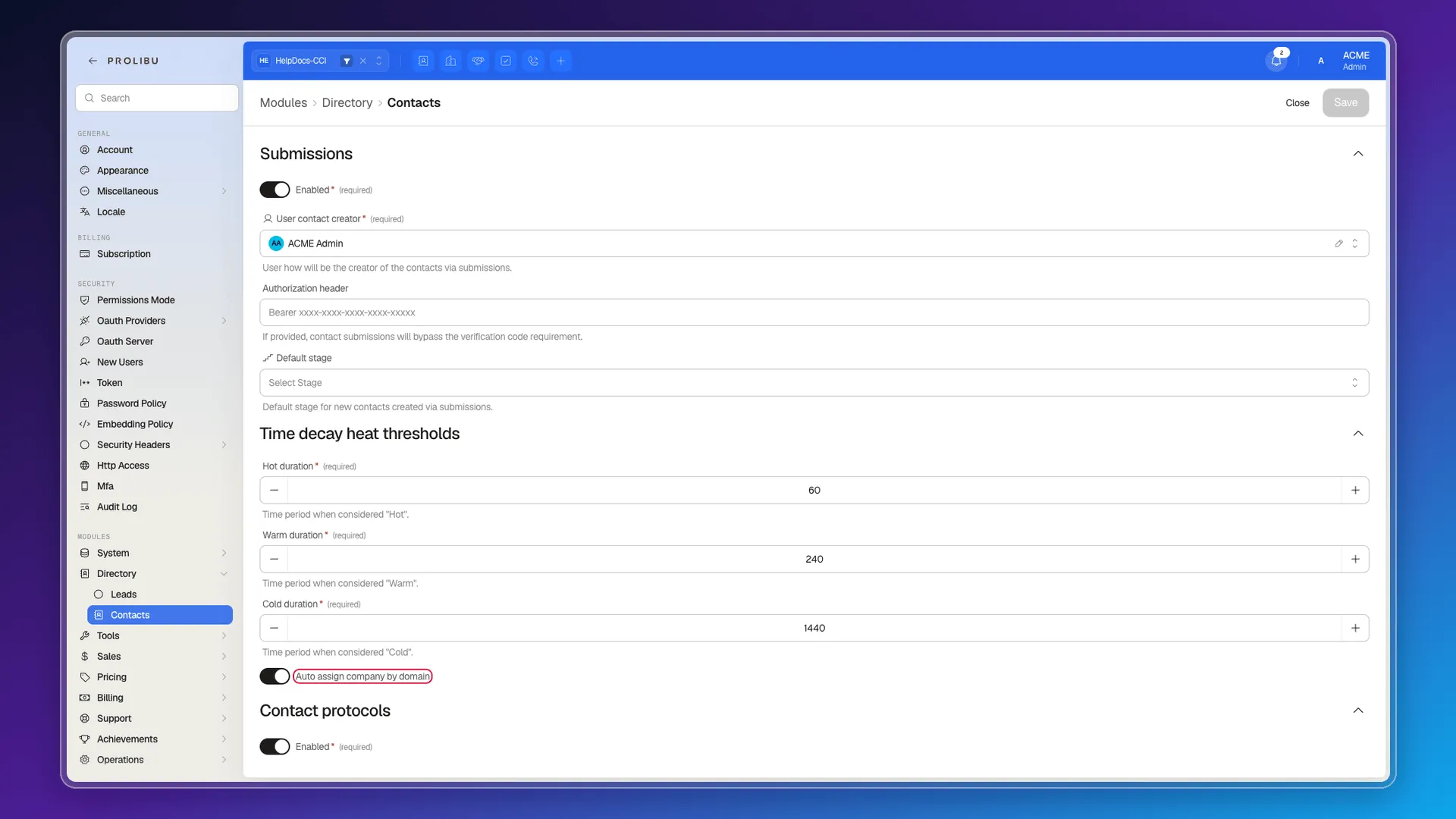
- Submissions — contacts created from forms, with the user recorded as creator, an optional authorisation header and a default stage.
- Time decay heat thresholds — the contact’s heat (hot, warm, cold) computed from the time since their last activity, with configurable thresholds.
- Auto assign company by domain — assigns the company by matching the contact’s email domain against the domains registered on companies.
- Contact protocols — the contact sequences.
Of these, only the third looks at email, and it looks at the address, not the message: it pairs person@company.com with whichever company has company.com among its domains. That’s enrichment from metadata, not from conversation.
What does get recorded from each email
Section titled “What does get recorded from each email”Even though content isn’t analysed, the activity does accumulate on the contact: Emails sent, Email opens, Email clicks and Email replies are available as columns in the Contacts table, alongside other activity metrics. And a contact’s email status changes on its own when a message bounces, is marked as spam, or the person opts out.
In other words: Prolibu learns from an email’s behaviour (whether it was opened, whether it bounced, whether they replied), not from its text.
Third-party integrations
Section titled “Third-party integrations”Preferences → Integrations → Third Party lists Apollo, Kaspr and OpenAI. The first two are contact-data providers and the third a language model, so they cover similar ground by a different route — enriching from external sources or with AI — but none is described as reading the CRM’s emails. All three were disabled in the account we reviewed, so we couldn’t test what they add.
What’s missing compared with HubSpot
Section titled “What’s missing compared with HubSpot”- Contact enrichment from email: updating job title, first name and last name from what appears in the thread.
- Extraction of new contacts mentioned in a conversation.
- Out-of-office detection and the return date.
- Job-change detection from a bounce or an auto-reply.
- The settings screen that governs it all (in HubSpot, Data Management → Data Enrichment → Conversational Enrichment), with its three independent toggles.
Frequently asked questions
No. We found no feature that analyses email content to update a contact's job title, name or availability.
No. Contacts are created by hand, by import or through a form.
Assigning the company by email domain, the heat rating by activity age, contact protocols, and creation through forms.
Preferences → Integrations → Third Party lists Apollo, Kaspr and OpenAI, but they enrich from external sources rather than from email content, and all three were disabled in the account we reviewed.
Was this article helpful?
Thanks for your feedback!